Our hybrid browser-use agent design: a planner agent that uses vision and sub-agents that are DOM-based.
For enterprises, trust in a browser-use agent is centered on the agents' ability to deliver accuracy at scale, repeatedly. Whether it be an integration with a SaaS software that doesn't provide APIs, or automating a mission-critical legacy workflow involving a 20-year old ERP system, an enterprise-ready agent that integrates company data, speeds up decision making, and saves time on repetitive tasks is finding widespread adoption in some of the largest enterprises we work with.
In this blog, we trace the evolution of browser agents, track the benchmarks that are available currently, and talk about some of the core optimizations that we've been able to deliver for our partners, making their production-grade browser-use agents faster and more accurate.
Evolution of browser agents using LLMs
Oct 2022 — Gur et al. show that LLMs understand HTML and can find out elements to click or type actions on from HTML text of page. [1]
Jul 2023 — WebAgent combines two LLMs for planning and action while browsing. One fine-tuned on HTML which understands current state and plans ahead and another to generate Selenium code to take actions. [2]
Oct 2023 — Set-of-Mark prompting is proposed for multimodal LLMs in which different regions of image are marked using an off-the-shelf segmentation model to improve visual grounding without fine-tuning. [3]
Jan 2024 — WebVoyager agent employs an LLM which consumes screenshots annotated like set-of-marks technique. It completes tasks by interacting with websites using tools for primitive GUI actions like click, input, scroll. [4]
Oct 2024 — SeeAct-V agent uses a visual grounding model to perceive the GUIs entirely visually, and take pixel-level operations on screens. [5]
Oct 2024 — Claude 3.5 Sonnet adds Computer Use, inferring on-screen coordinates from images. This was the first frontier model to have this capability. [6]
Dec 2024 — BrowserUse achieves highest scores on WebVoyager benchmark using a DOM-first approach, i.e. the agent gets current browser state as DOM instead of screenshot. [7]
Evaluation
Browser-agent benchmarks must resemble real user workflows, not demo tasks, and they must exercise a diverse set of skills so that high scores translate to real world usefulness.
Popular benchmarks
WebArena — A standalone, self-hostable web environment spanning websites from popular categories. It has a set of tasks to be performed using this environment. This approach avoids challenges of open web like pop-ups, ads, captchas etc. [8]
WebVoyager — Task suite on 15 representative websites. It lacks website diversity and recent agents get very high scores on this benchmark. [9]
OnlineMind2Web — It has tasks spanning 136 websites. The authors note many tasks in WebVoyager are solvable via Google Search alone, so they propose harder tasks. [10]
Evaluating agents on these benchmarks is also an open-ended problem. For most tasks there are many valid trajectories, so comparing runs to a single reference trajectory is suboptimal.
WebArena's standalone environment is reproducible, so agents can be scored directly from the final environment state. On the real web layouts and data change over time so WebArena and OnlineMind2Web instead rely on human evaluation or LLM-as-a-judge methods, with the latter being far more scalable while still tracking human judgments reasonably well.
Current browser agent limitations
Even the best browser agents struggle with recurring issues in production-grade workflows:
Vision-only agents that plan from screenshots are often slow, because every step requires capturing and processing a large image.
Pure DOM-based agents can be faster, but they are brittle on modern, heavily scripted apps where the HTML structure is noisy and doesn't always match what a human actually sees.
Long pages, tables, and dropdowns also cause agents to spend many steps just scrolling to the right place.
Fine-grained interactions like clicking a specific cell in a dense grid can be unreliable when the agent is guessing coordinates.
In enterprise scenarios, agents need access to internal tools and data sources without overwhelming the planning model with a huge tool list that bloats its context and hurts accuracy.
Addressing these limitations with a visual + DOM hybrid
We started from the Gemini computer use model as the main planning LLM and focused on balancing visual understanding with fast, structured DOM operations. The planner continues to reason over screenshots and high-level browser actions, which keeps it aligned with how humans perceive pages, but repetitive, precise, or data-heavy work is offloaded to specialized sub-agents and custom tools. This hybrid design lets us keep the strengths of vision-based agents while significantly improving latency on real tasks.
Hyde browser agent architecture diagram
Accessing enterprise data
The agent can query a sub agent when any enterprise data is needed to complete a task. The sub agent uses its suite of connectors to fetch data for answering the query.
We do not give direct access to connectors to the planning model to avoid overloading its context, as every tool definition takes up input tokens and clutters the context window, reducing agent accuracy. This abstraction also allows us to improve upon the data fetching sub-agent separately, which is a complex problem on its own. [11]
Custom tools
The browser runtime can execute arbitrary JavaScript. We added a tool to scroll a container to a target string. This speeds up long pages and drop-downs when the agent has lexical cues about the target.
From a given coordinate (x, y), it finds the nearest scrollable container, scans visible text nodes for matches, computes their offsets (relative to the container or window), then scrolls to it.
DOM-aware sub agents
DOM details are not sent to the main planning model to keep its context lean. For tasks like querying long pages or filling forms, sub-agents operate directly on DOM elements.
The sub-agents use Stagehand's act, observe, extract functions to interact with DOM. [12]
Scrolling through a large page to find information can be time consuming. The scroll_to_text tool defined earlier also requires some lexical information which the agent might not have about parts of the page it hasn't yet seen. We define a sub-agent which can be queried to fetch details directly from the accessibility tree of the page without needing to scroll.
Despite recent advances in multimodal LLMs, the computer use model can still make mistakes in fine grids. We define a helper sub-agent which can be given a location description to click at instead of clicking through coordinates. This sub-agent would identify the DOM element at the location and send a click event.
Form filling sub-agent is called with all the form field descriptions and values to be filled. It uses Stagehand's observe function to get DOM selectors for all the fields and act function to fill them. [13]
This division of tasks between the main vision agent and sub agents can be thought of as an exploration-exploitation trade-off, where concise screenshots are more helpful for planning when exploring a new website and interacting with DOM elements is much faster for already known flows. [14]
Results
In our tests, ChatGPT Atlas and Perplexity Comet underperformed on several simple tasks.
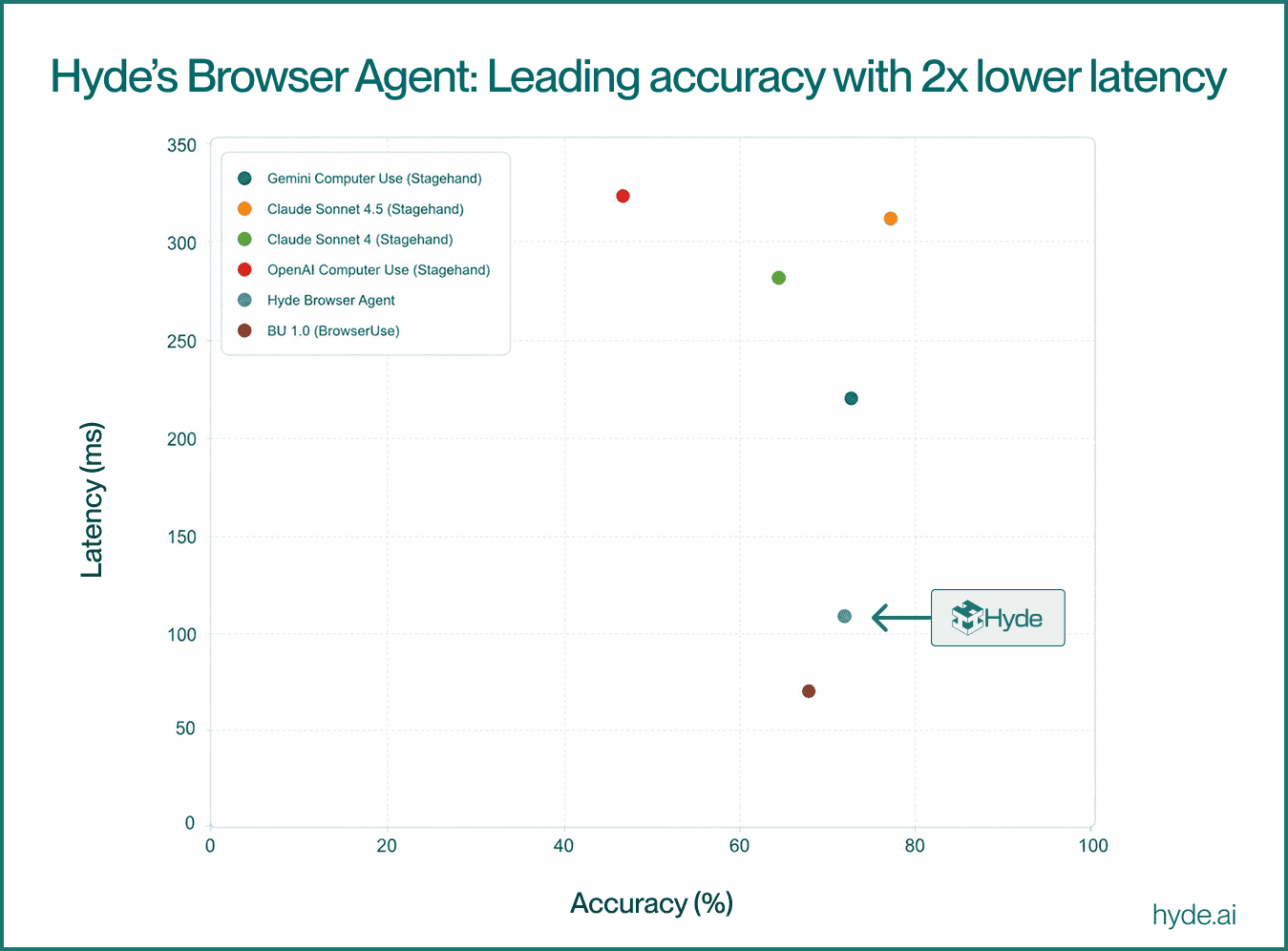
Our agent achieves a similar success rate to Stagehand (with the Gemini Computer Use model) with significantly lower LLM inference latency on OnlineMind2Web. It also outperforms BrowserUse 1.0 on success rate. See evaluation details and sources. [15]

LLM inference vs accuracy on OnlineMind2Web benchmark
Avenues for further efficiency gains
We are building an on-prem stack so enterprises can design, version, and evaluate MCP servers for these browser agents.
Some of the failures are due to browser runtime timeouts which can be solved by adding stateful retries. We can make the agent more durable by using LLMs to identify failures and course correction strategies based on failing trajectories.
Memory can help the agent navigate websites it has visited in the past more reliably and faster. Since less exploration would then be needed, we can rely more on our faster sub agents. MUSE [16] is an example of how adding a memory module can make agents self evolving with experience on long horizon productivity tasks. We plan on exploring memories for our browser agent in the future.
LLM-as-a-judge evaluators from WebVoyager and OnlineMind2Web align well with humans so they can be used to make a reward model which can help train smaller LLMs for web navigation tasks through reinforcement learning. WebAgent-R1 [17] attains a high score on WebArena [8] using GRPO-based RL with HTML inputs alone. It will be interesting to see whether small visually grounded models like InternVL [18] can improve upon that, similar to how Pix2Act [19] improved upon the text based web navigation models before it using visual human demonstrations, and whether LLM-as-a-judge rewards can help in scaling beyond simulated environments like WebArena to the open web.
References
Gur et al. arxiv.org/pdf/2210.03945
Gur et al. arxiv.org/pdf/2307.12856
Yang et al. arxiv.org/pdf/2310.11441
He et al. arxiv.org/pdf/2401.13919
Gou et al. arxiv.org/pdf/2410.05243
Zhou et al. arxiv.org/pdf/2307.13854
He et al. arxiv.org/pdf/2401.13919
Xue et al. arxiv.org/pdf/2504.01382
huggingface.co/learn/deep-rl-course/en/unit1/exp-exp-tradeoff
Evaluation scores for Stagehand were taken from the Gemini computer use announcement for Gemini and Browserbase's agent evaluation for OpenAI Operator and Claude models. Browser Use scores are from Speed Matters. Our agent was run on an m5.4xlarge instance in ap-south-1 with a Browserbase session in ap-southeast-1. Scoring used three LLM-as-a-judge evaluators: the OnlineMind2Web o4-mini eval script, the WebVoyager eval, and Stagehand evals. Final judgement was by majority vote.
Yang et al. arxiv.org/pdf/2510.08002
Wei et al. arxiv.org/pdf/2505.16421
Shaw et al. arxiv.org/pdf/2306.00245